Class PaneProgPane
- All Implemented Interfaces:
ImageObserver,MenuContainer,PropertyChangeListener,Serializable,EventListener,Accessible
- Direct Known Subclasses:
PaneProgDp3Action.ThisProgPane
Note that this is not only the panes carrying variables, but also the special purpose panes for the CV table, etc.
This class implements PropertyChangeListener so that it can be notified when a variable changes its busy status at the end of a programming read/write operation. There are four read and write operation types, all of which have to be handled carefully:
- Write Changes
- This must write changes that occur after the operation
starts, because the act of writing a variable/CV may change another. For
example, writing CV 1 will mark CV 29 as changed.
The definition of "changed" is operationally in the
VariableValue.isChanged()member function. - Write All
- Like write changes, this might have to go back and re-write a variable depending on what has previously happened. It should write every variable (at least) once.
- Read All
- This should read every variable once.
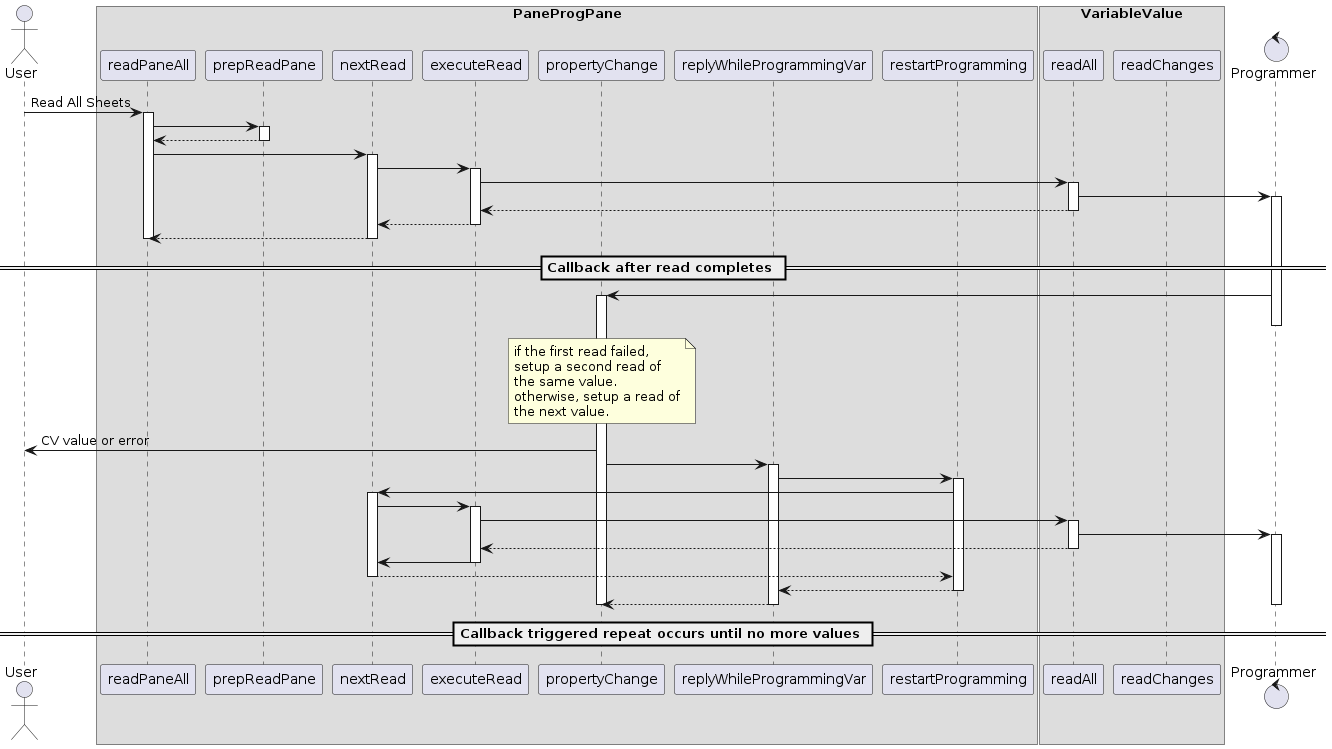
- Read Changes
- This should read every variable that's marked as changed. Currently, we use a common definition of changed with the write operations, and that someday might have to change.
- See Also:
-
Nested Class Summary
Nested ClassesNested classes/interfaces inherited from class javax.swing.JPanel
JPanel.AccessibleJPanelNested classes/interfaces inherited from class javax.swing.JComponent
JComponent.AccessibleJComponentNested classes/interfaces inherited from class java.awt.Container
Container.AccessibleAWTContainerNested classes/interfaces inherited from class java.awt.Component
Component.AccessibleAWTComponent, Component.BaselineResizeBehavior, Component.BltBufferStrategy, Component.FlipBufferStrategy -
Field Summary
FieldsModifier and TypeFieldDescriptionprotected CvTableModel(package private) boolean(package private) CvValue(package private) VariableValue(package private) booleanprotected VariableTableModelprotected JPanel(package private) JToggleButton(package private) JToggleButtonprotected PaneContainerThis remembers the CVs on this pane for the Read/Write sheet operation.(package private) long(package private) long(package private) ArrayList<FnMapPanel>list of fnMapping objects to dispose(package private) ArrayList<FnMapPanelESU>(package private) boolean(package private) boolean(package private) ItemListenerprotected ItemListener(package private) ItemListenerprotected ItemListener(package private) ItemListener(package private) ItemListener(package private) static final String(package private) static final String(package private) StringStore name of this programmer Tab (pane)list of JPanel objects to removeAll(package private) booleanprotected JToggleButtonprotected JToggleButtonprotected RosterEntryThis remembers the variables on this pane for the Read/Write sheet operation.(package private) intprotected JToggleButtonprotected JToggleButtonFields inherited from class javax.swing.JComponent
listenerList, TOOL_TIP_TEXT_KEY, ui, UNDEFINED_CONDITION, WHEN_ANCESTOR_OF_FOCUSED_COMPONENT, WHEN_FOCUSED, WHEN_IN_FOCUSED_WINDOWFields inherited from class java.awt.Component
accessibleContext, BOTTOM_ALIGNMENT, CENTER_ALIGNMENT, LEFT_ALIGNMENT, RIGHT_ALIGNMENT, TOP_ALIGNMENTFields inherited from interface java.awt.image.ImageObserver
ABORT, ALLBITS, ERROR, FRAMEBITS, HEIGHT, PROPERTIES, SOMEBITS, WIDTH -
Constructor Summary
ConstructorsConstructorDescriptionConstruct a null object.PaneProgPane(PaneContainer parent, String name, org.jdom2.Element pane, CvTableModel cvModel, VariableTableModel varModel, org.jdom2.Element modelElem, RosterEntry pRosterEntry) PaneProgPane(PaneContainer parent, String name, org.jdom2.Element pane, CvTableModel cvModel, VariableTableModel varModel, org.jdom2.Element modelElem, RosterEntry pRosterEntry, boolean isProgPane) Construct the Pane from the XML definition element. -
Method Summary
Modifier and TypeMethodDescriptionbooleanInvoked by "Compare Full Sheet" button, this sets in motion a continuing sequence of "confirm" operations on the variables and CVs in the Pane.booleanInvoked by "Compare changes on sheet" button, this sets in motion a continuing sequence of "confirm" operations on the variables and CVs in the Pane.intcountOpsNeeded(boolean read, boolean changes) Estimate the number of CVs that will be accessed when reading or writing the contents of this pane.voiddispose()(package private) voidenableButtons(boolean stat) (package private) voidEnable the compare all and compare changes button if possible.(package private) voidEnable the read all and read changes button if possible.(package private) voidexecuteRead(VariableValue var) (package private) voidgetName()(package private) JComponentgetRepresentation(String name, org.jdom2.Element var) Get a GUI representation of a particular variable for display.booleanvoidincludeInPrint(boolean inc) booleanisBusy()booleanisEmpty()Check if varList and cvList, and thus the tab, is empty.(package private) voidmakeCvTable(GridBagConstraints cs, GridBagLayout g, JPanel c) protected voidmakeLabel(org.jdom2.Element e, JPanel c, GridBagLayout g, GridBagConstraints cs) Create label from Element.makeOpsNeededSet(boolean read, boolean changes, Set<Integer> set) Produce a set of CVs that will be accessed when reading or writing the contents of this pane.protected voidmakeSoundLabel(org.jdom2.Element e, JPanel c, GridBagLayout g, GridBagConstraints cs) Create sound label from Element.(package private) StringmodifyToolTipText(String start, VariableValue variable) Takes default tool tip text, e.g. from the decoder element, and modifies it as needed.newColumn(org.jdom2.Element element, boolean showStdName, org.jdom2.Element modelElem) Create a single column from the JDOM column Element.newGrid(org.jdom2.Element element, boolean showStdName, org.jdom2.Element modelElem) Create a grid from the JDOM Element.protected voidnewGridGroup(org.jdom2.Element element, JPanel c, GridBagLayout g, PaneProgPane.GridGlobals globs, boolean showStdName, org.jdom2.Element modelElem) Create a new grid group from the JDOM group Element.newGridItem(org.jdom2.Element element, boolean showStdName, org.jdom2.Element modelElem, PaneProgPane.GridGlobals globs) Create a grid item from the JDOM Elementprotected JPanelnewGroup(org.jdom2.Element element, boolean showStdName, org.jdom2.Element modelElem) Create a new group from the JDOM group ElementnewRow(org.jdom2.Element element, boolean showStdName, org.jdom2.Element modelElem) Create a single row from the JDOM column ElementvoidnewVariable(org.jdom2.Element var, JComponent col, GridBagLayout g, GridBagConstraints cs, boolean showStdName) Add the representation of a single variable.(package private) booleanIf there are any more compare operations to be done on this pane, do the next one.(package private) booleannextRead()If there are any more read operations to be done on this pane, do the next one.(package private) boolean(package private) voidpickFnMapPanel(JPanel c, GridBagLayout g, GridBagConstraints cs, org.jdom2.Element modelElem) Pick an appropriate function map panel depending on model attribute.voidprepConfirmPane(boolean onlyChanges) Prepare this pane for a compare operation.voidprepReadPane(boolean onlyChanges) Prepare this pane for a read operation.voidprepWritePane(boolean onlyChanges) Prepare a "write full sheet" operation.voidvoidGet notification of a variable property change, specifically "busy" going to false at the end of a programming operation.booleanInvoked by "Read Full Sheet" button, this sets in motion a continuing sequence of "read" operations on the variables and CVs in the Pane.booleanInvoked by "Read changes on sheet" button, this sets in motion a continuing sequence of "read" operations on the variables and CVs in the Pane.voidvoid(package private) voidprotected voidsetBusy(boolean busy) (package private) voidvoid(package private) voidsetToRead(boolean justChanges, boolean startProcess) Set the "ToRead" parameter in all variables and CVs on this pane.(package private) voidsetToWrite(boolean justChanges, boolean startProcess) Set the "ToWrite" parameter in all variables and CVs on this paneprotected voidtoString()booleanInvoked by "Write full sheet" button to write all CVs.booleanInvoked by "Write changes on sheet" button, this sets in motion a continuing sequence of "write" operations on the variables in the Pane.Methods inherited from class javax.swing.JPanel
getAccessibleContext, getUI, getUIClassID, paramString, setUI, updateUIMethods inherited from class javax.swing.JComponent
addAncestorListener, addNotify, addVetoableChangeListener, computeVisibleRect, contains, createToolTip, disable, enable, firePropertyChange, firePropertyChange, firePropertyChange, fireVetoableChange, getActionForKeyStroke, getActionMap, getAlignmentX, getAlignmentY, getAncestorListeners, getAutoscrolls, getBaseline, getBaselineResizeBehavior, getBorder, getBounds, getClientProperty, getComponentGraphics, getComponentPopupMenu, getConditionForKeyStroke, getDebugGraphicsOptions, getDefaultLocale, getFontMetrics, getGraphics, getHeight, getInheritsPopupMenu, getInputMap, getInputMap, getInputVerifier, getInsets, getInsets, getListeners, getLocation, getMaximumSize, getMinimumSize, getNextFocusableComponent, getPopupLocation, getPreferredSize, getRegisteredKeyStrokes, getRootPane, getSize, getToolTipLocation, getToolTipText, getToolTipText, getTopLevelAncestor, getTransferHandler, getVerifyInputWhenFocusTarget, getVetoableChangeListeners, getVisibleRect, getWidth, getX, getY, grabFocus, hide, isDoubleBuffered, isLightweightComponent, isManagingFocus, isOpaque, isOptimizedDrawingEnabled, isPaintingForPrint, isPaintingOrigin, isPaintingTile, isRequestFocusEnabled, isValidateRoot, paint, paintBorder, paintChildren, paintComponent, paintImmediately, paintImmediately, print, printAll, printBorder, printChildren, printComponent, processComponentKeyEvent, processKeyBinding, processKeyEvent, processMouseEvent, processMouseMotionEvent, putClientProperty, registerKeyboardAction, registerKeyboardAction, removeAncestorListener, removeNotify, removeVetoableChangeListener, repaint, repaint, requestDefaultFocus, requestFocus, requestFocus, requestFocusInWindow, requestFocusInWindow, resetKeyboardActions, reshape, revalidate, scrollRectToVisible, setActionMap, setAlignmentX, setAlignmentY, setAutoscrolls, setBackground, setBorder, setComponentPopupMenu, setDebugGraphicsOptions, setDefaultLocale, setDoubleBuffered, setEnabled, setFocusTraversalKeys, setFont, setForeground, setInheritsPopupMenu, setInputMap, setInputVerifier, setMaximumSize, setMinimumSize, setNextFocusableComponent, setOpaque, setPreferredSize, setRequestFocusEnabled, setToolTipText, setTransferHandler, setUI, setVerifyInputWhenFocusTarget, setVisible, unregisterKeyboardAction, updateMethods inherited from class java.awt.Container
add, add, add, add, add, addContainerListener, addImpl, addPropertyChangeListener, addPropertyChangeListener, applyComponentOrientation, areFocusTraversalKeysSet, countComponents, deliverEvent, doLayout, findComponentAt, findComponentAt, getComponent, getComponentAt, getComponentAt, getComponentCount, getComponents, getComponentZOrder, getContainerListeners, getFocusTraversalKeys, getFocusTraversalPolicy, getLayout, getMousePosition, insets, invalidate, isAncestorOf, isFocusCycleRoot, isFocusCycleRoot, isFocusTraversalPolicyProvider, isFocusTraversalPolicySet, layout, list, list, locate, minimumSize, paintComponents, preferredSize, printComponents, processContainerEvent, processEvent, remove, remove, removeAll, removeContainerListener, setComponentZOrder, setFocusCycleRoot, setFocusTraversalPolicy, setFocusTraversalPolicyProvider, setLayout, transferFocusDownCycle, validate, validateTreeMethods inherited from class java.awt.Component
action, add, addComponentListener, addFocusListener, addHierarchyBoundsListener, addHierarchyListener, addInputMethodListener, addKeyListener, addMouseListener, addMouseMotionListener, addMouseWheelListener, bounds, checkImage, checkImage, coalesceEvents, contains, createImage, createImage, createVolatileImage, createVolatileImage, disableEvents, dispatchEvent, enable, enableEvents, enableInputMethods, firePropertyChange, firePropertyChange, firePropertyChange, firePropertyChange, firePropertyChange, firePropertyChange, getBackground, getBounds, getColorModel, getComponentListeners, getComponentOrientation, getCursor, getDropTarget, getFocusCycleRootAncestor, getFocusListeners, getFocusTraversalKeysEnabled, getFont, getForeground, getGraphicsConfiguration, getHierarchyBoundsListeners, getHierarchyListeners, getIgnoreRepaint, getInputContext, getInputMethodListeners, getInputMethodRequests, getKeyListeners, getLocale, getLocation, getLocationOnScreen, getMouseListeners, getMouseMotionListeners, getMousePosition, getMouseWheelListeners, getParent, getPropertyChangeListeners, getPropertyChangeListeners, getSize, getToolkit, getTreeLock, gotFocus, handleEvent, hasFocus, imageUpdate, inside, isBackgroundSet, isCursorSet, isDisplayable, isEnabled, isFocusable, isFocusOwner, isFocusTraversable, isFontSet, isForegroundSet, isLightweight, isMaximumSizeSet, isMinimumSizeSet, isPreferredSizeSet, isShowing, isValid, isVisible, keyDown, keyUp, list, list, list, location, lostFocus, mouseDown, mouseDrag, mouseEnter, mouseExit, mouseMove, mouseUp, move, nextFocus, paintAll, postEvent, prepareImage, prepareImage, processComponentEvent, processFocusEvent, processHierarchyBoundsEvent, processHierarchyEvent, processInputMethodEvent, processMouseWheelEvent, remove, removeComponentListener, removeFocusListener, removeHierarchyBoundsListener, removeHierarchyListener, removeInputMethodListener, removeKeyListener, removeMouseListener, removeMouseMotionListener, removeMouseWheelListener, removePropertyChangeListener, removePropertyChangeListener, repaint, repaint, repaint, requestFocus, requestFocus, requestFocusInWindow, resize, resize, setBounds, setBounds, setComponentOrientation, setCursor, setDropTarget, setFocusable, setFocusTraversalKeysEnabled, setIgnoreRepaint, setLocale, setLocation, setLocation, setMixingCutoutShape, setName, setSize, setSize, show, show, size, transferFocus, transferFocusBackward, transferFocusUpCycle
-
Field Details
-
LAST_GRIDX
- See Also:
-
LAST_GRIDY
- See Also:
-
_cvModel
-
_varModel
-
container
-
rosterEntry
-
_cvTable
boolean _cvTable -
bottom
-
l1
-
l2
-
l3
-
l4
-
l5
-
l6
-
isCvTablePane
boolean isCvTablePane -
mName
Store name of this programmer Tab (pane) -
varList
This remembers the variables on this pane for the Read/Write sheet operation. They are stored as a list of Integer objects, each of which is the index of the Variable in the VariableTable. -
varListIndex
int varListIndex -
cvList
This remembers the CVs on this pane for the Read/Write sheet operation. They are stored as a set of Integer objects, each of which is the index of the CV in the CVTable. Note that variables are handled separately, and the CVs that are represented by variables are not entered here. So far (sic), the only use of this is for the cvtable rep. -
cvListIterator
-
readChangesButton
-
readAllButton
-
writeChangesButton
-
writeAllButton
-
confirmChangesButton
-
confirmAllButton
-
justChanges
boolean justChanges -
cvReadSoFar
long cvReadSoFar -
cvReadStartTime
long cvReadStartTime -
_programmingVar
-
_programmingCV
-
_read
boolean _read -
fnMapList
list of fnMapping objects to dispose -
fnMapListESU
-
panelList
list of JPanel objects to removeAll -
print
boolean print
-
-
Constructor Details
-
PaneProgPane
public PaneProgPane()Construct a null object.Normally only used for tests and to pre-load classes.
-
PaneProgPane
public PaneProgPane(PaneContainer parent, String name, org.jdom2.Element pane, CvTableModel cvModel, VariableTableModel varModel, org.jdom2.Element modelElem, RosterEntry pRosterEntry) -
PaneProgPane
public PaneProgPane(PaneContainer parent, String name, org.jdom2.Element pane, CvTableModel cvModel, VariableTableModel varModel, org.jdom2.Element modelElem, RosterEntry pRosterEntry, boolean isProgPane) Construct the Pane from the XML definition element. In case this is invoked from off the Swing/AWT thread, it defers to that thread in a granular manner.- Parameters:
parent- The parent panename- Name to appear on tab of panepane- The JDOM Element for the pane definitioncvModel- Already existing TableModel containing the CV definitionsvarModel- Already existing TableModel containing the variable definitionsmodelElem- "model" element from the Decoder Index, used to check what decoder options are present.pRosterEntry- The current roster entry, used to get sound labels.isProgPane- True if the pane is a default programmer pane
-
-
Method Details
-
setNoDecoder
-
getName
-
toString
-
enableReadButtons
void enableReadButtons()Enable the read all and read changes button if possible. This checks to make sure this is appropriate, given the attached programmer's capability. -
enableConfirmButtons
void enableConfirmButtons()Enable the compare all and compare changes button if possible. This checks to make sure this is appropriate, given the attached programmer's capability. -
countOpsNeeded
Estimate the number of CVs that will be accessed when reading or writing the contents of this pane.- Parameters:
read- true if counting for read, false for writechanges- true if counting for a *Changes operation; false, if counting for a *All operation- Returns:
- the total number of CV reads/writes needed for this pane
-
makeOpsNeededSet
Produce a set of CVs that will be accessed when reading or writing the contents of this pane.- Parameters:
read- true if counting for read, false for writechanges- true if counting for a *Changes operation; false, if counting for a *All operationset- The set to fill. Any CVs already in here will not be duplicated, which provides a way to aggregate a set of CVs across multiple panes.- Returns:
- the same set as the parameter, for convenient chaining of operations.
-
enableButtons
-
readPaneChanges
Invoked by "Read changes on sheet" button, this sets in motion a continuing sequence of "read" operations on the variables and CVs in the Pane. Only variables in states marked as "changed" will be read.- Returns:
- true is a read has been started, false if the pane is complete.
-
prepReadPane
Prepare this pane for a read operation.The read mechanism only reads variables in certain states (and needs to do that to handle error processing right now), so this is implemented by first setting all variables and CVs on this pane to TOREAD via this method
- Parameters:
onlyChanges- true if only reading changes; false if reading all
-
readPaneAll
Invoked by "Read Full Sheet" button, this sets in motion a continuing sequence of "read" operations on the variables and CVs in the Pane. The read mechanism only reads variables in certain states (and needs to do that to handle error processing right now), so this is implemented by first setting all variables and CVs on this pane to TOREAD in prepReadPaneAll, then starting the execution.- Returns:
- true is a read has been started, false if the pane is complete
-
setToRead
Set the "ToRead" parameter in all variables and CVs on this pane.- Parameters:
justChanges- true if this is read changes, false if read allstartProcess- true if this is the start of processing, false if cleaning up at end
-
setToWrite
Set the "ToWrite" parameter in all variables and CVs on this pane- Parameters:
justChanges- true if this is read changes, false if read allstartProcess- true if this is the start of processing, false if cleaning up at end
-
executeRead
-
executeWrite
-
nextRead
boolean nextRead()If there are any more read operations to be done on this pane, do the next one.Each invocation of this method reads one variable or CV; completion of that request will cause it to happen again, reading the next one, until there's nothing left to read.
- Returns:
- true is a read has been started, false if the pane is complete.
-
nextConfirm
boolean nextConfirm()If there are any more compare operations to be done on this pane, do the next one.Each invocation of this method compares one CV; completion of that request will cause it to happen again, reading the next one, until there's nothing left to read.
- Returns:
- true is a compare has been started, false if the pane is complete.
-
writePaneChanges
Invoked by "Write changes on sheet" button, this sets in motion a continuing sequence of "write" operations on the variables in the Pane. Only variables in isChanged states are written; other states don't need to be.- Returns:
- true if a write has been started, false if the pane is complete
-
writePaneAll
Invoked by "Write full sheet" button to write all CVs.- Returns:
- true if a write has been started, false if the pane is complete
-
prepWritePane
Prepare a "write full sheet" operation.- Parameters:
onlyChanges- true if only writing changes; false if writing all
-
nextWrite
boolean nextWrite() -
prepConfirmPane
Prepare this pane for a compare operation.The read mechanism only reads variables in certain states (and needs to do that to handle error processing right now), so this is implemented by first setting all variables and CVs on this pane to TOREAD via this method
- Parameters:
onlyChanges- true if only confirming changes; false if confirming all
-
confirmPaneChanges
Invoked by "Compare changes on sheet" button, this sets in motion a continuing sequence of "confirm" operations on the variables and CVs in the Pane. Only variables in states marked as "changed" will be checked.- Returns:
- true is a confirm has been started, false if the pane is complete.
-
confirmPaneAll
Invoked by "Compare Full Sheet" button, this sets in motion a continuing sequence of "confirm" operations on the variables and CVs in the Pane. The read mechanism only reads variables in certain states (and needs to do that to handle error processing right now), so this is implemented by first setting all variables and CVs on this pane to TOREAD in prepReadPaneAll, then starting the execution.- Returns:
- true is a confirm has been started, false if the pane is complete.
-
isBusy
-
setBusy
-
propertyChange
Get notification of a variable property change, specifically "busy" going to false at the end of a programming operation. If we're in a programming operation, we then continue it by reinvoking the nextRead/writePane operation.- Specified by:
propertyChangein interfacePropertyChangeListener- Parameters:
e- the event to respond to
-
replyWhileProgrammingVar
-
replyWhileProgrammingCV
-
restartProgramming
void restartProgramming() -
stopProgramming
-
newGroup
protected JPanel newGroup(org.jdom2.Element element, boolean showStdName, org.jdom2.Element modelElem) Create a new group from the JDOM group Element- Parameters:
element- element containing group contentsshowStdName- show the name following the rules for the nameFmt elementmodelElem- element containing the decoder model- Returns:
- a panel containing the group
-
newGridGroup
protected void newGridGroup(org.jdom2.Element element, JPanel c, GridBagLayout g, PaneProgPane.GridGlobals globs, boolean showStdName, org.jdom2.Element modelElem) Create a new grid group from the JDOM group Element.- Parameters:
element- element containing group contentsc- the panel to create the grid ing- the layout manager for the panelglobs- properties to configure gshowStdName- show the name following the rules for the nameFmt elementmodelElem- element containing the decoder model
-
newColumn
public JPanel newColumn(org.jdom2.Element element, boolean showStdName, org.jdom2.Element modelElem) Create a single column from the JDOM column Element.- Parameters:
element- element containing column contentsshowStdName- show the name following the rules for the nameFmt elementmodelElem- element containing the decoder model- Returns:
- a panel containing the group
-
newRow
Create a single row from the JDOM column Element- Parameters:
element- element containing row contentsshowStdName- show the name following the rules for the nameFmt elementmodelElem- element containing the decoder model- Returns:
- a panel containing the group
-
newGrid
Create a grid from the JDOM Element.- Parameters:
element- element containing group contentsshowStdName- show the name following the rules for the nameFmt elementmodelElem- element containing the decoder model- Returns:
- a panel containing the group
-
newGridItem
public JPanel newGridItem(org.jdom2.Element element, boolean showStdName, org.jdom2.Element modelElem, PaneProgPane.GridGlobals globs) Create a grid item from the JDOM Element- Parameters:
element- element containing grid item contentsshowStdName- show the name following the rules for the nameFmt elementmodelElem- element containing the decoder modelglobs- properties to configure the layout- Returns:
- a panel containing the group
-
makeLabel
Create label from Element.- Parameters:
e- element containing label contentsc- panel to insert label intog- panel layout managercs- constraints on layout manager
-
makeSoundLabel
protected void makeSoundLabel(org.jdom2.Element e, JPanel c, GridBagLayout g, GridBagConstraints cs) Create sound label from Element.- Parameters:
e- element containing label contentsc- panel to insert label intog- panel layout managercs- constraints on layout manager
-
makeCvTable
-
setCvListFromTable
void setCvListFromTable() -
pickFnMapPanel
Pick an appropriate function map panel depending on model attribute.- If attribute extFnsESU="yes":
- Invoke
FnMapPanelESU(VariableTableModel v, List<Integer> varsUsed, Element model) - Otherwise:
- Invoke
FnMapPanel(VariableTableModel v, List<Integer> varsUsed, Element model)
- Parameters:
modelElem- element containing model attributesc- panel to add function map panel tog- panel layout managercs- constraints on layout manager
-
newVariable
public void newVariable(org.jdom2.Element var, JComponent col, GridBagLayout g, GridBagConstraints cs, boolean showStdName) Add the representation of a single variable. The variable is defined by a JDOM variable Element from the XML file.- Parameters:
var- element containing variablecol- column to insert label intog- panel layout managercs- constraints on layout managershowStdName- show the name following the rules for the nameFmt element
-
getRepresentation
Get a GUI representation of a particular variable for display.- Parameters:
name- Name used to look up the Variable objectvar- XML Element which might contain a "format" attribute to be used in theVariableValue.getNewRep(java.lang.String)call from the Variable object; "tooltip" elements are also processed here.- Returns:
- JComponent representing this variable
-
modifyToolTipText
Takes default tool tip text, e.g. from the decoder element, and modifies it as needed.Intended to handle e.g. adding CV numbers to variables.
- Parameters:
start- existing tool tip textvariable- the CV- Returns:
- new tool tip text
-
getRep
-
dispose
-
isEmpty
Check if varList and cvList, and thus the tab, is empty.- Returns:
- true if empty
-
includeInPrint
-
includeInPrint
-
printPane
-